
Howard Lerman
Roam Founder
Mastering Dvorak Made Me 3% Faster
December 4, 2025
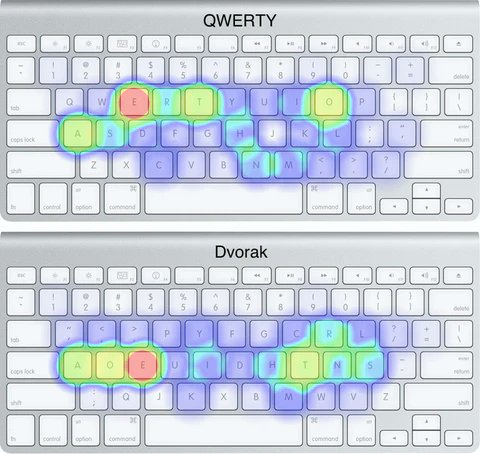
I spent the past 3 months rewiring 30 years of muscle memory: I switched from QWERTY to the Dvorak Keyboard. It’s way better. My WPM typing speed is up 3% and my hands don’t cramp anymore so I can go both faster AND longer.
Here’s how I did it. What follows is not for the faint hearted.
- I have never been a particularly fast or accurate typer. My fine motor dexterity is a weakness for me and my qwerty typing speed is about 75 words per minute.
- The biggest challenge is that the physical keys don’t match up to the keys on the screen as you type them. If you have a laptop and a desktop computer, I recommend you start with one or the other first and only. Your brain will just learn to type a certain form within that specific context.
- You can easily switch your default keyboard settings on any Mac or PC. Dvorak is a built in option. I don’t know about Linux, but I’m guessing it’s possible there as well.
- All the vowels - aoeui - are in the left center. And the most frequently used consonants dhtns are in the right middle. “e” is middle finder left, “t” is middle finger right.
- I recommend starting with your name. You’ll be able to learn that pretty fast and it’s satisfying to be able to type something.
- I keep a daily journal, which is fairy free form. I use it as sort of a workspace for everything on my mind - whether it’s a to do list, or a blueprint for a product idea.
- As I was at the beginning stage, my deal with myself was that I was going to write my daily journal in Dvorak, then switch back to qwerty so I didn’t tank my productivity for the day. I have some pretty childlike journal entries for a few weeks there.
- After about 14 days of journaling exclusively in Dvorak, I switched my laptop computer over completely. This was by far hardest period. I was tempted to switch back to qwerty constantly, but if I really needed to type in qwerty, I would get up and walk to my desktop computer. Adding this barrier gave me an out if I was feeling frustrated while ensuring I continued to push through when it was super hard.
- Y was the hardest letter for me to master. For some reason, this one just took me the longest to relearn how to type. It’s the only vowel not in the core left middle. And frustratingly it’s exactly one position over from original Y.
- Passwords were the hardest thing to master and came last. I often was locking myself out of my computer because I defiantly wasn’t revealing the keys on keystroke and for a long time had accuracy problems.
- My typing speeds on Dvorak are about 3% faster, 78 words per minute. This may seem like a small number, but it compounds serious! People think faster than they can speak, and they speak faster than they can type. This is, btw, one of the reasons I am very bullish on voice and voice powered interfaces.
- Due to the more efficient layout, the movement and strain on my hands is way, way less. Dvorak reduces motion by around 31% for english language typers. This is significant and I am able to type much more effortlessly.
- While I mastered Dvorak on desktop, I still use qwerty on my mobile phone.
- ps: I think doing seriously hard things like this which require total concentration to express yourself are good for your brain. Just like pushing your muscles to the limit induces hypertrophy, pushing your mind to the limit induces braingain. Other examples of this are learning a new language in a fully immersed environment or doing something like surfing through rough terrain. I believe this sort of concentrated learning is the perfect antidote to the endless scrolling slop warping our minds.
Guides
All Virtual Office Platform GuidesVirtual Office Platform GuideVideo Conferencing GuideEnterprise Messaging GuideAI Note Taker GuideMeeting Scheduler GuideScreen Recorder GuideVirtual Events GuideAI Assistant for Work GuideVirtual All-Hands GuideUse Cases
AI StartupsCrypto and Web3 TeamsDesign AgenciesEcommerce AgenciesInsurance TeamsMortgage TeamsRemote TeamsExecutive Assistants© 2026 Roam HQ